Speech Bubble Sizes for Every Platform (Reddit, Discord, Instagram, TikTok, X)
A bubble that looks fine on a monitor can vanish on a phone. This is the size sheet: what each platform documents, how large the bubble should be in the frame, what type size still reads, and which export preset hits that box.
By Jam Hsiao ·
Image sizes and safe areas, by platform
Numbers below are what the platforms publish, plus our export preset. Where a company does not document a feed pixel size, the table says so. Safe areas are app overlays, not uploader crops.
| Platform | What they document | Our preset | Safe area / gotcha |
|---|---|---|---|
| Reddit feed | No feed pixel size in Reddit Help. Comment images max 240 px on the longest side. | Reddit post, 1200 w | Keep type out of the far corners; the feed thumbnail crops aggressively on mobile. |
| Discord chat | Free 20 MB; Nitro Basic 50 MB; Nitro 500 MB (File Attachments FAQ, Aug 2026). | 1× canvas, GIF or PNG | Light-theme meme crop wants white. Dark theme shows the white as a shape. |
| Discord emoji | 128×128 render target (server emoji). | 128×128 | One or two words, or no text. Tails get clipped if they sit on the edge. |
| Discord sticker | 320×320, PNG or APNG. | 320×320 | Transparency is expected. Do not fill the square with a photo background. |
| Instagram feed | Up to 1080 px wide; aspect 1.91:1 to 3:4 (566–1440 tall at 1080). Instagram Help, image resolution. | 1080×1080 | Square is the safe crop. Landscape 1.91:1 and portrait 3:4 are the documented extremes; anything outside is cropped. |
| TikTok | Ads help: vertical 9:16, ≥540×960. Organic For You uses the same 9:16 frame. | No TikTok preset; export 1× or 4K and crop 9:16 | UI covers the top (~username / Following) and a deep bottom stack (caption, music, buttons). Keep the bubble in the middle third. |
| X (Twitter) | Photos 5 MB; GIFs 5 MB mobile / 15 MB web. Single photos 2:1–3:4 display in full (X Help, posting pictures). | 1200×675 (16:9 card) | Timeline previews crop toward 16:9. Put the bubble and the face in the centre, not the top edge. |
Reddit Help’s article on images in comments is the page that names a pixel number: comment images display at a maximum of 240 pixels on the longest side. That is a comment thumbnail, not a post. Reddit does not pin a feed-post pixel size, so we do not invent one. Our Reddit post preset is 1200 px wide. Use PNG for the cropped-white speech bubble meme so the white field stays flat against light-theme Reddit. A comment bubble needs a thick outline and almost no interior text, because it will be shown at 240 px.
Discord
Discord is three size problems. Chat files: the File Attachments FAQ (13 August 2026) sets free uploads at 20 MB, Nitro Basic at 50 MB, Nitro at 500 MB. GIF favorites: Discord will star a GIF, not a PNG, which is why the Discord speech bubble maker defaults to GIF — steps in How to favorite a GIF on Discord. Emoji and stickers: 128×128 and 320×320, matching our presets. A 128-pixel bubble cannot hold a sentence.
Instagram’s Image resolution of photos you share on Instagram page stores photos up to 1080 pixels wide. Widths between 320 and 1080 with an aspect between 1.91:1 and 3:4 (566–1440 tall at 1080 wide) keep that resolution; wider files scale down to 1080; unsupported ratios are cropped. Our Instagram square preset is 1080×1080. For portrait, export a tall canvas instead of forcing the square. Stories and Reels are 9:16 — centre the bubble, off the sticker tray.
TikTok
TikTok’s creator help does not publish a feed-photo pixel table. Ads Manager creative specifications recommend vertical 9:16 at a minimum of 540×960. Organic For You uses the same full-screen 9:16 player — in production, 1080×1920. We do not ship a TikTok preset; export 1× from a 9:16 canvas, or 2× / 4K on Pro. Keep the bubble in the middle third: username sits on the top, and caption plus the like column eat the bottom and the right. Square and landscape uploads letterbox; if the bubble is the joke, do not letterbox it.
X (Twitter)
X Help’s How to Post pictures or GIFs caps photos at 5 MB and GIFs at 5 MB on mobile / 15 MB on web (GIF, JPEG, PNG). A single photo between 2:1 and 3:4 displays in full; other ratios get a cropped preview. Our X / Twitter card preset is 1200×675 (16:9), which keeps a face and a bubble in the timeline. A tall 9:16 screenshot will show the top and hide a bubble you put at the bottom.
How big the bubble should be relative to the frame
Platform boxes tell you the canvas. They do not tell you whether the bubble is shouting or whispering. A useful rule, independent of network:
- One speaker, one line: the bubble is about a quarter of the shorter side. On a 1080-square Instagram post that is a bubble around 250–320 px wide.
- A sentence: 30–40% of the shorter side, still with a margin so the tail can reach a mouth without covering the eyes.
- A meme crop: the white field is allowed to eat 20–40% of the top of the photo. That is the format, not a mistake. See the Twitter, TikTok and Instagram meme guide for that crop.
- Emoji and sticker: the bubble is the image. Stroke has to be thick. Interior text is optional.
Leave 8–16 px between the bubble and the frame edge on a 1080 canvas. Platforms crop previews toward the centre. Point the tail at a face. Two speakers need two bubbles; see types of speech bubbles.
Font sizes that stay readable on a phone
Design the type for the smallest place the file will be seen. A 1080-wide Instagram square is about 390 CSS pixels on an iPhone 13.
- 1080-wide social post: 32–48 px for the line in the bubble. Below ~28 px, the letters become texture after Instagram or X compresses the JPEG.
- 1200-wide Reddit / X card: 36–52 px. Timeline previews are smaller than the expanded photo.
- 9:16 TikTok still: 48–72 px, and never in the bottom 480 px of a 1920-tall frame.
- 320 sticker: 28–36 px, one or two words, Comic or Marker rather than a thin Default.
- 128 emoji: skip the sentence. A letter, a glyph, or no text.
Default, Comic, Handwritten, Marker, and Pixel are the editor fonts. Comic and Marker survive compression; Pixel is honest when small. More in the fonts article.
Hit each size from the export menu
Next to Download, the menu has format, motion, and size. Free keeps 1× and still GIF/PNG/JPG/WebP. Pro unlocks 2×, 4K (long side 3840), and the preset row.
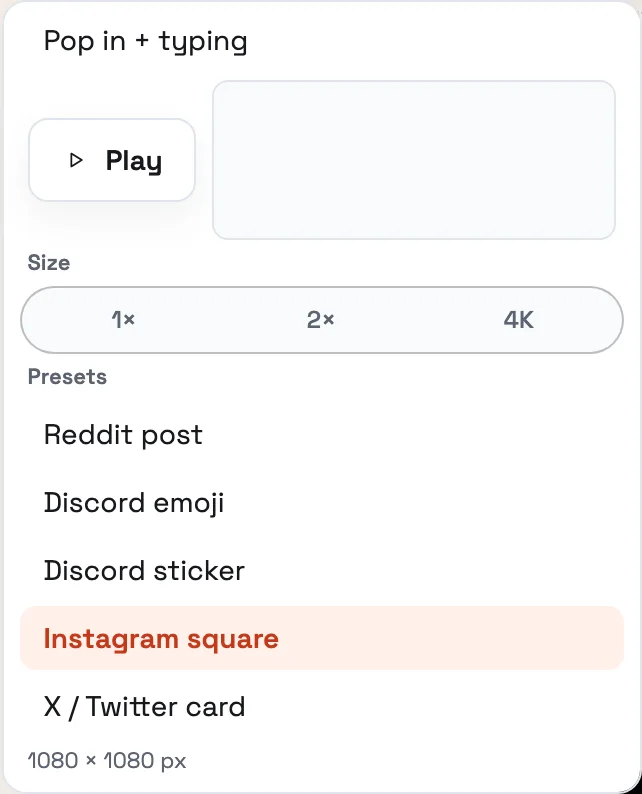
The presets, in the labels the menu actually uses:
- Reddit post — 1200 px wide, height follows the picture.
- Discord emoji — 128×128.
- Discord sticker — 320×320.
- Instagram square — 1080×1080.
- X / Twitter card — 1200×675.
A preset is 1× of that box; you do not stack 4K on a 128 emoji. Motion (Still, Pop in, Pop in + typing) is separate: Play is free, GIF/WebM export is Pro. There is no TikTok row — use a 9:16 canvas. A strip from the comic strip maker is one image; size it with the Reddit or Instagram preset.
Frequently Asked Questions
What size should a speech bubble image be for Instagram?
What size is a Discord emoji or sticker?
Does Reddit publish a pixel size for feed posts?
What size should a speech bubble be inside the frame?
How do I export the right size from AddSpeechBubble?
Related articles:
Related tools: